
Guide to iSCSI Cable
Published: March 7, 2024
By: Gene Everette, David Nicholson

Factors to consider when buying an iSCSI cable.
When it comes to setting up an iSCSI network, one of the most important components is the cable. A high-quality, reliable iSCSI cable is crucial for ensuring optimal performance and stability in your network. However, with so many options available on the market, it can be overwhelming to know which factors to consider when purchasing an iSCSI cable. In this section, we will discuss the key factors that you should keep in mind before making a purchase.
- Cable Type: One of the first things to consider when buying an iSCSI cable is its type. The two main types of cables used for iSCSI are copper and fiber optic. Copper cables are less expensive and easier to install but have limitations in terms of distance and speed compared to fiber optic cables. Fiber optic cables can transmit data at higher speeds over longer distances but are more expensive and require specialized expertise for installation.
- Length: The length of the cable type is another crucial factor to consider as it directly impacts on its performance and functionality within your network setup. You must determine the exact distance between your storage devices and select a cable that meets that requirement without any interference or signal loss or noise.
The maximum distance supported by iSCSI cables varies depending on their category. Cat5 and Cat6 cables support a maximum distance of 100 meters or about 328 feet. If you are planning on connecting devices over longer distances, then fiber optic cables are recommended as they have significantly higher maximum distances. Another critical factor to consider is the layout and placement of your devices. If your devices are closed, shorter cables may be enough. However, if there are obstacles or turns in the path between them, longer cables may be necessary to ensure proper connectivity. Additionally, it is always recommended to leave some slack in your cable for future adjustments or device replacements.
- Bandwidth: Bandwidth refers to the maximum amount of data that a cable can transfer per second, measured in bits per second (bps). It is essential to choose a cable with sufficient bandwidth capacity for your network’s needs as insufficient bandwidth can lead to slow data transfer rates and affect overall system performance.
- Durability: Since iSCSI networks often handle large amounts of critical data transfers, it is necessary to invest in durable cables that can withstand constant use without deteriorating quickly or causing interruptions in connectivity.
- Shielding: Shielding helps protect against electromagnetic interference (EMI) which can cause disruptions or distortions in signal transmission. When selecting an iSCSI cable, make sure it has adequate shielding suitable for your specific environment.
- Cost: Cost is an important consideration for any purchase, and iSCSI cables are no exception. While it may be tempting to opt for the cheapest option available, it is crucial to remember that quality and performance often come at a higher cost. Consider your budget but also prioritize the features and specifications you require for your network’s optimal functionality.
- Installation Environment: You should consider factors such as sources of high EMF (DC motors, AC light fixtures, microwaves, and X-rays), extreme temperatures, moisture, and physical stress when choosing a cable type.
- Compatibility: Ensuring compatibility with existing networking equipment such as switches, routers, and network interface cards may be required for optimal performance.
When buying an iSCSI cable, consider the type, length, bandwidth, durability, shielding, and cost to ensure you choose the best-suited cable for your network needs. Investing in a high-quality iSCSI cable can save you time and money in the long run by providing a stable and efficient network setup.
What is iSCSI?
iSCSI stands for Internet Small Computer System Interface and is a protocol used to transmit data over a network. It allows for the transfer of SCSI commands, which are typically used in traditional storage systems, to be sent over IP networks. This enables storage devices to be accessed remotely and provides an efficient and cost-effective solution for connecting storage devices.
Traditionally, SCSI (Small Computer System Interface) was the most common way of transferring data between computers and storage devices such as hard drives, tape drives, or CD/DVD drives. However, with the growth of internet connectivity and cloud computing, there was a need for a more flexible and scalable solution that could support remote access to storage devices.
iSCSI utilizes standard Ethernet infrastructure, making it easier to implement and manage compared to other types of networking technologies. It also offers greater flexibility as it can work with any operating system or hardware that supports TCP/IP protocol.
One of the key benefits of iSCSI is its ability to provide block-level access to storage devices. This means that instead of accessing files on a server through a file-sharing protocol like NFS (Network File System) or CIFS (Common Internet File System), iSCSI allows direct access at the block level. This results in faster data transfers and increased performance overall.
Another advantage is its cost-effectiveness. Since iSCSI uses existing Ethernet infrastructure, there is no need for expensive Fibre Channel equipment or cables. This makes it an ideal choice for small businesses or organizations that may not have the budget for high-end networking equipment.
iSCSI also offers impressive scalability capabilities. As new storage needs arise, additional capacity can easily be added by connecting more hard disks to an iSCSI target device without having to make major changes to the network infrastructure.
It’s worth noting that while iSCSI may not offer the same speed as Fibre Channel technology when it comes to large-scale enterprise applications, it is still a reliable and efficient solution for small to medium-sized organizations.
ISCSI is an advanced storage networking technology that provides cost-effective, scalable, and flexible solutions for remote access to storage devices. Its ability to utilize standard Ethernet infrastructure and provide block-level access make it an ideal choice for businesses looking to optimize their data transfer processes while keeping costs in check.
Understanding iSCSI Cables and Transceivers
iSCSI cables are an essential component for setting up a reliable and efficient iSCSI storage system. These cables are responsible for connecting the iSCSI initiators (such as servers or workstations) to the target devices (such as storage arrays), allowing for data transfer over the network.
There are several types of iSCSI cables available in the market, each with its own unique features and capabilities. In this section, we will take a closer look at these different types of iSCSI cables, their components, and their characteristics, to help you make an informed decision when purchasing one for your setup. iSCSI cables are made up of two connectors on either end of the cable, with a fixed cable going between them.
Cables
Ethernet Cables

Modern Ethernet cables use the RJ45 connector and are available in a variety of different types. Generally, Ethernet cables are divided into different generations, or Categories – shortened to “Cat.” The higher the number, the more recent the cable, the better performance and often the better shielding. As a result, Cat6 Ethernet cables typically outperform Cat5e cables, while Cat8 cables outperform Cat6 cables.
Choosing the right Ethernet cable type has never been more important as rapidly changing specifications, applications, and technology have outpaced many previous choices in wire type. You need to consider a wide range of factors when choosing Ethernet cables for your project. Technological advancements constantly push limits, and unexpected environment changes can also affect your choices.
Direct Attached Copper (DAC) Cables
Direct connection between both cable ends, transmission happens through copper wire.

In the world of iSCSI technology, a DAC cable is an essential component for direct communication between devices. These cables utilize modules on both ends, made with ~26-28 AWG twinax copper wire for efficient data transmission over short distances. The connectors on each end are specifically designed to seamlessly connect with compatible ports on networking equipment, allowing for quick and reliable connectivity in iSCSI applications. As data speeds increase, the electromagnetic shielding around the copper wires becomes stronger, protecting against interference and maintaining signal integrity throughout the transmission process. With a fixed length and specialized design, DAC cables provide a dependable solution for establishing high-speed connections in iSCSI environments.
There are two connectors on either end of DAC cables, with a fixed cable going between them. Unlike optical transceivers, copper cables have a fixed length and are limited by signal integrity in maximum length.
Active Optical Cables
Electronic components within connection, transmission happens through an optical cable.

Active optical cables (AOCs) use optical fibers like traditional fiber optic cables but with additional active components that boost their performance over longer distances without signal degradation. AOCs offer higher bandwidth and data transfer speeds compared to DACs, making them suitable for large-scale deployments.
Fiber Optic Cables
There are many cable and connector combinations available. Below are a few examples multimode and single-mode fiber optic cables.

SC connection with OM1 multimode fiber optic cable.

LC connection with OM3 multimode fiber optic cable.

MTP/MPO connection with OM4 multimode fiber optic cable.

LC connection with OS2 single-mode fiber optic cable.
Fiber optic cables offer higher speeds and longer distances compared to copper cables. They use glass fibers instead of copper wires to transmit data signals through light pulses, making them immune to electromagnetic interference and capable of reaching distances up to 10 kilometers (about 6.21 mi) without any signal degradation. However, they tend to be more expensive than copper cables.
Multimode vs Single-Mode Cables
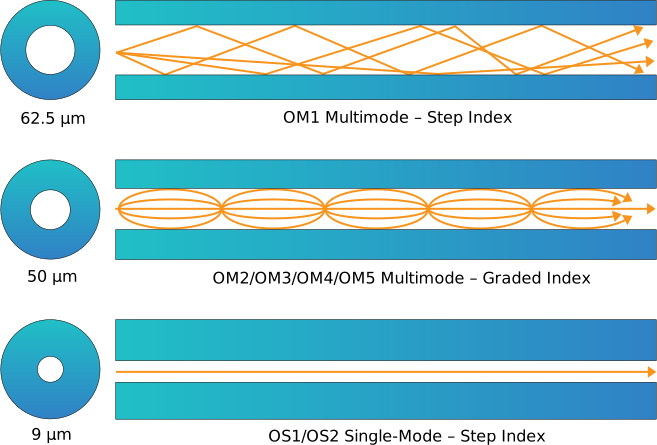
Both copper and fiber optic cables come in two different modes: multimode and single-mode. Multimode cables have a larger core diameter and are suitable for short-range connections, while single-mode cables have a smaller core diameter and can transmit data over longer distances with less signal loss.
Fiber Type vs Speed and Maximum Distance
Designation
Designation
Transceivers
A transceiver is a combination transmitter/receiver in a single package.
There are many types of transceivers including SFP, SFP+, SFP28, XFP, QSFP, QSFP+. QSFP28, and CFP. Our goal is to help you understand the differences between SFP+, QSFP+, and QSFP28, which are the most used transceivers by Nfina.
SFP+

SFP+ 10GB

SFP+ 10GB
SFP+, also known as small form-factor pluggable. The SFP+ transceiver is a more advanced version of SFP. Most SFP+ transceivers is made to operate at 10Gbps. SFP+ transceivers are popular data center cabling solutions. SFP+ transceivers are available in copper and fiber depending on their application.
QSFP+

QSFP+ 10GB

QSFP+ 40GB
QSFP+ is an abbreviation for quad (4-channel) small form-factor pluggable optics. A QSFP+ optic is another small, hot-pluggable transceiver, but it supports 4x10G or 4x14G SFP+ data rates, which increases bandwidth capabilities. According to their application, QSFP+ transceivers are available in copper or fiber.
QSFP28

QSFP28 25GB

QSFP28 50GB

QSFP28 100GB
The QSFP28 transceiver, also known as quad small form-factor pluggable 28, is a state-of-the-art technology specifically designed for high-speed networking purposes. It has four differential signal channels that can achieve data speeds ranging from 25 Gbps to 40 Gbps, and finally, meet 100 Gbps Ethernet (4×25 Gbps) and 100 Gbps 4X InfiniBand Enhanced Data Rate (EDR) requirements. This makes it ideal for demanding tasks such as iSCSI storage connectivity in data centers. Its exceptional performance capabilities enable smooth integration with storage systems and help maintain optimal network efficiency for critical business operations. QSFP28 is now the standard interface of choice for 100G applications.
More specifications of SFP vs SFP+ vs QSFP+ vs QSFP28 are listed in the table below.
The QSFP28 transceiver, also known as quad small form-factor pluggable 28, is a state-of-the-art technology specifically designed for high-speed networking purposes. It has four differential signal channels that can achieve data speeds ranging from 25 Gbps to 40 Gbps, and finally, meet 100 Gbps Ethernet (4×25 Gbps) and 100 Gbps 4X InfiniBand Enhanced Data Rate (EDR) requirements. This makes it ideal for demanding tasks such as iSCSI storage connectivity in data centers. Its exceptional performance capabilities enable smooth integration with storage systems and help maintain optimal network efficiency for critical business operations. QSFP28 is now the standard interface of choice for 100G applications.
SFP+ vs QSFP+ vs QSFP28 Transceiver Specifications
SFF-8431
SFF-8432
QSFP+ MSA
SFF-8436
SFF-8636
Infiniband 40G QDR
QSFP28 MSA
SFF-8665
SFF-8636
8.5 GB
10 GB
112 GB
1310nm
1550nm
CWDM
DWDM
BIDI
Tunable
Copper
1310nm
832-918nm
1310nm
CWDM4
OM4
OS1
OS2
OM4
OS1
OS2
OM4
OS1
OS2
RJ45
MTP/MPO
MTP/MPO-12
Conclusion
When it comes to setting up an iSCSI network, selecting the right iSCSI cable is a critical component in ensuring optimal performance and stability. A high-quality, reliable iSCSI cable will not only help in maximizing the efficiency of data transfer but also play a significant role in maintaining the overall integrity of your network infrastructure. The importance of investing in a good quality iSCSI cable cannot be overstated as it directly impacts the reliability and speed of your storage system. By choosing the appropriate iSCSI cable for your network, you can rest assured that you are taking necessary steps towards creating a secure and efficient storage environment for your business operations.

At Nfina, our Eco-Friendly Solutions make it easy for our customers to achieve a lower carbon footprint and play a positive role in bringing about a sustainable future. We design technologies and products to help people understand their impact and actions better.
Nfina’s Hybrid Cloud and Hyperconverged solutions provide energy efficiency by using high-density, lower-power VMs enabling our customers to scale their digital transformations sustainably by optimizing space, reducing power consumption, and lowering cooling and maintenance costs. Nfina is taking a leadership role in doing what it takes to tackle climate change.
Nfina has been carbon neutral for our operations since opening in 2012.