
Simplify Data Management with Nfina’s Shared Storage Solutions
Check out our Shared Storage Solutions below or schedule a conversation to learn more.
Nfina 9524R-SAN-S
5th Generation Intel® Xeon®
Scalable Processor High-Availability Shared Storage Cluster

MSRP Starting at
$19,330.18
- Form Factor: 2x 2U rack-mount
- Processor: Up to 2x 5th Generation Intel® Xeon® Scalable Processor (per chassis)
- Memory: 16 DIMM slots, 1.5TB max memory capacity (per chassis)
- Drive Bays: 2x M.2 NVMe SSD or 2.5” SSD boot drives (RAID 1) (per chassis)
- Ethernet: 2x 10GbE (10/100/1000) LAN ports standard (per chassis)
- PCIe Slots: 2x PCIe Gen 5 x16 slots, 2x PCIe Gen 5 x8 slots (per chassis)
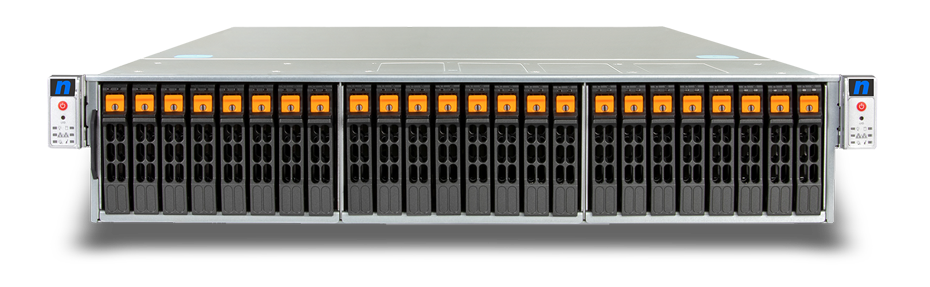
Nfina 8524R-SAN-S
5th Generation Intel® Xeon®
Scalable Processor All-in-One,
Shared Storage SAN
MSRP Starting at
$17,016.70
- Form Factor: 2x hot-pluggable controllers in a 2U rack-mount
- Processor: 1x 5 Generation Intel® Xeon® Scalable Processor (per controller)
- Memory: 8 DIMM slots, 2TB max memory capacity (per controller)
- Drive Bays: 24x 2.5″ hot-swap PCIe 5.0 NVMe drive bays
- Ethernet: 2x 10GbE (100/1000/10000) LAN with Intel® X710 (per controller)
- PCIe Slots: 2x PCIe® Gen5 x16 slots (per controller), 2 x PCIe® Gen5 x8 slots (per controller)
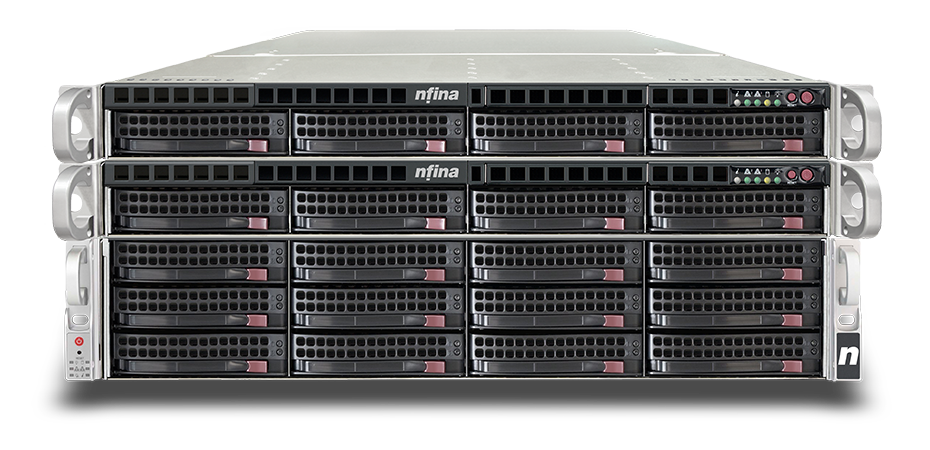
Nfina 1404R-SAN-S
5th Generation Intel® Xeon®
Scalable Processor High-Availability Shared Storage Cluster
MSRP Starting at
$11,598.27
- Form Factor: 2x 1U rack-mount
- Processor: 1x 5th Generation Intel® Xeon® Scalable Processor (per chassis)
- Memory: 8 DIMM slots, 2TB max memory capacity (per chassis)
- Drive Bays: 2 x 2.5” SSD boot drives, (RAID 1), 1 x M.2 NVMe (2280/22110), PCIe 3.0 x 2, per chassis (per chassis)
- Ethernet: 2x 10GbE (10/100/1000) LAN ports standard (per chassis)
- PCIe Slots: 2x PCIe Gen 5 x16 slots, 1x PCIe Gen 5 x8 slots (per chassis)
What is Shared Storage?
Shared storage is a crucial component in modern business operations, revolutionizing the way companies manage and access their data. In simple terms, shared storage refers to a centralized storage system that allows multiple users to store and retrieve data from a common pool of resources. This setup eliminates the need for individual hard drives or isolated storage solutions, promoting seamless collaboration and efficiency within an organization.
By utilizing shared storage, businesses can streamline their workflows and boost productivity by providing employees with instant access to critical files and documents. This accessibility ensures that team members can work on projects simultaneously without encountering version control issues or delays.
Moreover, shared storage facilitates cost savings by reducing the need for redundant hardware purchases and minimizing maintenance expenses associated with managing multiple independent storage systems. Additionally, it offers enhanced scalability options, allowing businesses to easily expand their storage capacity as needed without disrupting daily operations.
Shared storage gives multiple servers and applications centralized access to the same data, improving availability, scalability, and management efficiency. For organizations that need to support block, file, and shared-storage workloads within a single platform, Nfina’s unified storage solutions provide a broader range of architectures designed for virtualization, databases, backup, high availability, and growing data requirements.
How Does Shared Storage Work?
Shared storage works by allowing multiple users within a business to access and store data on a centralized storage system. This system eliminates the need for individual devices to store files, making it easier to manage and share information across the organization.
When a file is saved to shared storage, it is stored in one location that can be accessed by authorized users from various devices simultaneously. This real-time accessibility ensures that everyone is working with the most up-to-date version of a document, reducing errors and improving collaboration.
Shared storage uses network protocols to enable communication between users’ devices and the central storage unit. These protocols ensure secure data transfer and efficient sharing of resources without compromising on speed or reliability.
Overall, shared storage simplifies data management processes, streamlines workflows, and promotes seamless collaboration among team members – ultimately enhancing productivity and driving business success.
Shared Storage in Business Operations
Shared file storage in business operations offers a myriad of benefits that can significantly enhance efficiency, productivity, and collaboration within an organization. By utilizing shared storage solutions, teams can seamlessly access and share files and data in real-time, eliminating the need for time-consuming file transfers or version control issues. This streamlined workflow leads to increased efficiency as employees can quickly locate and work on the same documents without delays.
Enhanced collaboration is another key advantage of using shared storage solutions in business operations. Teams can collaborate on projects more effectively when they have instant access to shared files and folders from any location. Whether working remotely or in-office, employees can easily collaborate on documents simultaneously without worrying about conflicting versions.
Scalability is another notable benefit of shared storage solutions. As businesses grow and generate more data, traditional storage methods may become insufficient to handle the increasing volume of information. Shared storage systems offer scalability options that allow organizations to expand their capacity seamlessly as needed without disrupting daily operations.
Additionally, data security and backup capabilities are crucial advantages provided by shared storage solutions. By centralizing data management and implementing robust security measures, businesses can protect sensitive information from unauthorized access or loss due to system failures or disasters.
Increased Efficiency and Productivity
By utilizing shared storage, teams can access files and data quickly and easily from one centralized location. This eliminates the need for time-consuming searches across multiple devices or systems, saving valuable time and increasing overall efficiency.
Furthermore, with shared storage facilitating seamless collaboration among team members, projects can progress smoothly without delays caused by file versioning issues or communication gaps. This streamlined workflow leads to enhanced productivity levels across the board.
Cost Savings
Shared storage allows for better resource utilization as multiple users can access and store data on the same platform, eliminating the need for redundant storage devices. This optimized use of resources translates to cost efficiencies for your business, allowing you to allocate budget towards other critical areas of operation. Additionally, with shared storage solutions offering scalability options, you can easily expand your storage capacity without significant additional expenses.
Embracing shared storage not only enhances operational efficiency but also contributes to long-term cost savings by minimizing downtime risks associated with data loss or system failures. By investing in a robust shared storage solution tailored to meet your business needs, you are setting the foundation for sustainable growth while keeping expenses in check.
Enhanced Collaboration
Gone are the days of back-and-forth emails or searching through multiple folders for the latest version of a file. With shared storage systems in place, everyone can work on the same document simultaneously, making edits and updates visible to all parties instantly. This not only streamlines workflows but also eliminates errors caused by working on outdated information.
Furthermore, enhanced collaboration through shared storage promotes innovation and creativity within your organization. Team members can brainstorm ideas together more effectively when they have easy access to relevant resources and materials. This leads to more efficient problem-solving processes and ultimately drives business growth.
Scalability
With scalable shared storage, you have the flexibility to increase or decrease your storage capacity without disrupting operations or investing in new infrastructure. This agility allows businesses to respond quickly to evolving demands and ensures that data accessibility remains seamless for employees across departments.
By having a scalable shared storage solution in place, organizations can future-proof their operations and avoid potential bottlenecks caused by limited storage capacity. Whether you need more space for additional files or applications, scalability ensures that your business can continue growing without constraints.
Data Security and Backup
With shared storage solutions, you can ensure that your data is protected from potential threats such as cyber-attacks or hardware failures. By storing data in a centralized location, you reduce the risk of data loss and unauthorized access.
Shared storage systems often come with built-in encryption features that help safeguard sensitive information. In addition, regular backups can be automated to prevent any disruptions in case of system failures or accidental deletions. This added layer of protection gives businesses peace of mind knowing that their data is securely stored and easily recoverable when needed.
Types of Shared Storage Solutions
When it comes to shared storage solutions, businesses have a variety of options to choose from based on their specific needs. One common differentiation is between on-premises and cloud-based solutions. On-premises shared storage involves physical hardware located within the company’s premises, offering control and security but requiring maintenance.
Cloud-based shared storage, on the other hand, utilizes remote servers accessed through the internet, providing flexibility and scalability without the need for dedicated IT resources.
Network Attached Storage (NAS) is another popular solution that allows multiple users to access files over a local network. It is cost-effective and easy to set up for small to medium-sized businesses.
Storage Area Network (SAN) offers high-speed access to centralized data storage for larger enterprises with heavy data demands. SAN provides enhanced performance and can be scaled as needed.
Nfina’s Shared Storage Solutions
Nfina’s High-Availability Shared Storage Cluster combines high-performance computing with redundant backup, dependable disaster recovery, and effortless storage expansion.
Nfina’s shared storage solutions utilize a dual controller architecture combined with one or more JBODs to create a centralized storage pool for accessing, protecting, and storing data. Our shared storage solutions are resilient and highly available designed to remove single points of failure. The Nfina-Store platform allows users to centrally manage storage arrays and clusters and create unlimited immutable snapshots of the storage system. If a failure or ransomware
attack occurs, the backup protection provides a rollback function that restores data to a safe state within minutes. A lengthy reconstruction of the data is not required.
Nfina’s Storage Solutions offer NAS, SAN, Hybrid Cloud, and Cloud Hosting for comprehensive and flexible options for businesses looking to improve their data storage capabilities. With these solutions, businesses can securely store and access their data from multiple devices and locations, increasing efficiency and productivity.
In addition to NAS and SAN solutions, Nfina also offers hybrid cloud and cloud hosting options as part of its storage services. These options allow businesses to easily expand their storage capacity without having to invest in expensive hardware upgrades. Hybrid cloud combines both on-premises infrastructure with off-site cloud services, providing scalability while maintaining control over sensitive data. Cloud hosting removes the need for physical hardware altogether by storing all data on remote servers accessed through an internet connection.
Another significant advantage of Nfina’s shared storage solutions is enhanced security measures. Data stored on these systems is regularly backed up and protected against cyber threats such as malware or ransomware attacks. Nfina offers customizable access controls, ensuring that only authorized individuals can view or edit sensitive information.
FAQ
- How does Nfina’s “Unified Storage” architecture reduce our total cost of ownership (TCO)?
Nfina’s unified storage consolidates block and file share level (SMB/CIFS & NFS) data onto a single platform. This means you can avoid buying separate SAN (Storage Area Network) and NAS (Network-Attached Storage) devices. By running all workloads on a single converged or hyperconverged system, you reduce upfront hardware costs, simplify IT management, and eliminate the need for multiple separate licenses and maintenance contracts.
- What are the standard warranty and support terms included in the purchase?
Every storage device purchased or leased from Nfina includes a standard five-year warranty, which is significantly longer than the three-year market standard. This package also includes professional consulting and 24/7 US-based technical supportto assist with troubleshooting, patch management, and ransomware remediation at no additional charge.
- How scalable are these systems if our data requirements grow rapidly?
The shared storage solutions utilize a dual-controller architecture combined with JBOD (Just a Bunch of Disks) expansion units. You can scale capacity independently of compute by adding more disks or nodes seamlessly. For instance, a single SAN solution can connect to up to 14 JBOD devices, allowing you to expand your system by up to 336 additional drives as your business grows. All you have to do is add additional drives and license the additional storage.
- What built-in features protect our data against ransomware and hardware failure?
Nfina systems are designed for high availability (up to 99.99% uptime) and include several “ransomware-proof” features:
-Immutable Snapshots: Read-only copies of data that cannot be altered or deleted.
-One-Click Failover: Using Nfina-View™ software, you can failover to a backup and be operational in minutes, not days, after a failure.
-Self-Encrypting Drives (SEDs): Hardware-based encryption that makes data unreadable if a drive is physically removed.
– All Nfina storage systems are designed to support Geographic redundancy.
- Can we integrate these on-premises solutions with our existing cloud strategy?
Yes. Nfina offers a Hybrid Cloud approach that maintains redundant copies of critical data both on-site and off-site. The Nfina-View™ Unified Dashboard management tool provides a single “pane of glass” dashboard to monitor and manage both your private on-premises storage and public cloud storage simultaneously. This allows for rapid geo-redundant disaster recovery without the high ingress/egress fees often associated with public hyperscale clouds.
Other Data Storage Solutions
SAN Solutions

NAS Solutions
