
Enterprise JBOD Storage Solutions
Nfina’s enterprise JBOD storage solutions provide a cost-effective way to expand the capacity of servers, SAN systems, NAS appliances, backup platforms, and private cloud environments. Available in 2U and 4U configurations, these high-density JBOD enclosures support hot-swappable SAS and SATA drives, 12Gb/s SAS connectivity, and scalable capacities of up to 576TB.
Nfina 6224JBOD
2U Rackmount JBOD
Expansion Storage

MSRP Starting at
$2708.19
- Form Factor: 2U rackmount enclosure
- Drive Bays: 24x 2.5″ hot-swap drive bays
- Maximum Storage: 184TB
- Connectivity: 12Gb/s SAS
- Interface: 4x Mini-SAS HD Ports
- Expander: 1x SAS Expander
- Warranty: 5 years
Nfina 602JBOD-B
2U Rackmount JBOD
Expansion Storage

MSRP Starting at
$2557.39
- Form Factor: 2U rackmount enclosure
- Drive Bays: 12x 3.5″ or 2.5″ hot-swap drive bays
- Maximum Storage: 288TB
- Connectivity: 12Gb/s SAS
- Interface: 8x Mini-SAS HD Ports
- Expander: 2x SAS Expanders
- Warranty: 5 years
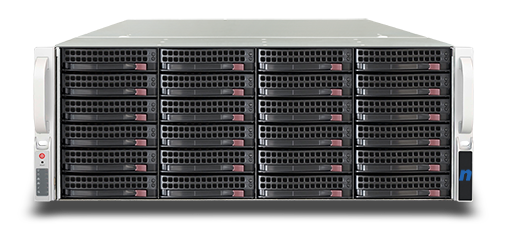
Nfina 604JBOD-A
4U Rackmount JBOD
Expansion Storage
MSRP Starting at
$3753.63
- Form Factor: 4U rackmount enclosure
- Drive Bays: 24x 3.5″ or 2.5″ hot-swap drive bays
- Maximum Storage: 576TB
- Connectivity: 12Gb/s SAS
- Interface: 4x Mini-SAS HD Ports
- Expander: 1x SAS Expander
- Warranty: 5 years
| Model | Form factor | Drive bays | Maximum capacity | SAS expanders | Best suited for |
|---|---|---|---|---|---|
| Nfina 6224JBOD | 2U | 24 × 2.5-inch | 184TB | 1 | Dense small-form-factor storage |
| Nfina 602JBOD-B | 2U | 12 × 3.5/2.5-inch | 288TB | 2 | Redundant-path storage expansion |
| Nfina 604JBOD-A | 4U | 24 × 3.5/2.5-inch | 576TB | 1 | High-capacity backup and archives |
JBOD Storage Solutions for Scalable Enterprise Data Growth
As organizations generate and retain larger volumes of data, storage scalability becomes a critical component of IT infrastructure planning. JBOD (Just a Bunch of Disks) storage solutions provide a cost-effective and flexible way to expand storage capacity without replacing existing servers, storage arrays, or data center infrastructure. By adding high-density storage enclosures as needed, organizations can accommodate growing data requirements while maximizing existing technology investments.
What Is a JBOD Storage Solution?
A JBOD enclosure is a dedicated storage expansion system that houses multiple hard drives or solid-state drives and connects directly to servers, NAS systems, SAN environments, or storage controllers. Unlike traditional storage arrays that include integrated processing and storage management functions, JBOD systems focus on providing scalable capacity expansion while allowing organizations to manage storage through existing infrastructure platforms.
This architecture delivers exceptional flexibility for businesses that require large amounts of storage capacity without unnecessary complexity or expense.
JBOD solutions are often used for backup repositories, media archives, surveillance data, high-capacity file storage, and other workloads where cost-effective scalability is more important than built-in redundancy. Because JBOD does not automatically protect data from drive failure, businesses should pair it with reliable disaster and recovery backup, replication, or data-protection strategies.
How does a JBOD work?
A JBOD storage system works by housing multiple hard disk drives or solid-state drives within a single storage enclosure and connecting them to a server through a high-speed interface such as SAS. In a standard configuration, each drive is presented to the host system as an independent storage device rather than being automatically combined into a RAID array.
The server’s operating system, host bus adapter, RAID controller, or software-defined storage platform then determines how the drives are organized and managed. A built-in SAS expander allows numerous drives to communicate through a smaller number of external connections, making it possible to add large amounts of storage without installing every drive directly inside the server.
Depending on the configuration, the disks can remain separate or be combined into storage pools, RAID groups, backup repositories, and archive volumes. Because JBOD does not inherently provide redundancy, critical data should be protected through RAID, backups, replication, snapshots, or another data-protection strategy.
This flexible architecture makes enterprise JBOD storage a cost-effective solution for expanding backup capacity, media archives, surveillance storage, research datasets, and other high-capacity workloads.
JBOD vs. RAID: What Is the Difference?
A JBOD storage system works by placing multiple hard disk drives or solid-state drives inside a dedicated storage enclosure and connecting them to a server, storage array, or other host system through a high-speed interface such as 12Gb/s SAS. Unlike a traditional RAID array, which combines drives into a protected or performance-optimized group, a JBOD enclosure typically presents each drive individually to the host. This gives administrators greater flexibility to manage capacity through the operating system, software-defined storage platform, RAID controller, or host bus adapter.
Inside the enclosure, a SAS expander acts much like a network switch for storage devices. It allows many drives to communicate with one or more external host connections without requiring a separate cable for every disk. Mini-SAS HD ports carry data between the JBOD enclosure and the connected server, while the host bus adapter or RAID controller determines how the drives are recognized and managed. In some environments, the drives may remain independent, while in others they can be organized into RAID groups, storage pools, backup repositories, or software-defined storage clusters.
The 12Gb/s SAS interface is especially important in enterprise JBOD storage because it provides high-bandwidth connectivity for backup, archiving, surveillance, virtualization, media, and large-capacity data workloads. Dual-expander JBOD enclosures can also support redundant data paths, allowing connected servers or controllers to maintain access if one path becomes unavailable. However, because JBOD does not provide data redundancy by itself, organizations should use appropriate RAID configurations, replication, snapshots, or backup systems when storing critical information.
This flexible design makes a JBOD storage enclosure a practical option for businesses that need to expand storage capacity without replacing their existing server or storage infrastructure. By adding more drives or additional enclosures over time, organizations can scale storage while maintaining centralized management and compatibility with their current environment.
What are the Benefits of Enterprise JBOD Storage Expansion?
Organizations across many industries choose JBOD storage solutions because they offer:
- Cost-effective storage growth
- High-density storage capacity
- Flexible SAS and SATA drive support
- Simplified storage expansion
- Efficient use of existing infrastructure
- Support for backup and disaster recovery and archive environments
- Scalable data retention capabilities
- Reduced storage management complexity
These advantages make JBOD systems a practical solution for organizations seeking to balance performance, capacity, and budget requirements.
What are the Ideal Use Cases for JBOD Storage?
JBOD storage enclosures are commonly deployed in environments that require large-scale capacity expansion, including:
- Enterprise backup repositories
- Long-term archive storage
- Video surveillance retention systems
- Data replication environments
- Disaster recovery infrastructure
- Virtualization and private cloud storage
- Research and analytics workloads
- Media and content storage
- Large-scale file repositories
- Hybrid cloud storage architectures
Because JBOD systems can scale incrementally, organizations can add storage capacity as needed while maintaining operational efficiency and controlling costs.
Building a Future-Ready Storage Infrastructure
Data growth is expected to continue accelerating across virtually every industry. Organizations that implement scalable storage expansion strategies are better positioned to support future business requirements without frequent infrastructure replacements. JBOD storage solutions provide the flexibility, reliability, and capacity needed to support evolving workloads while extending the life of existing storage investments.
Whether expanding a backup environment, building a large archive repository, supporting virtualization infrastructure, or preparing for future data growth, enterprise JBOD solutions offer a proven path toward scalable and cost-effective storage expansion.
FAQ
How many JBOD units can be daisy-chained to a single server?
Nfina units are typically designed for incremental expansion; for example, up to six JBODs can often be integrated into a single network for massive capacity growth.
What is the maximum storage capacity per rack unit?
Current models like the 602JBOD-B offer up to 288TB in a 2U form factor, while the 4U models can reach 576TB.
Does the enclosure support mixed drive types (SSD and HDD)?
Yes, Nfina JBODs support both 3.5″ and 2.5″ drive bays, allowing for high-speed SSDs or high-capacity HDDs depending on the application.
Are dual SAS expanders available for failover?
High-availability models, such as the 602JBOD-B, feature dual SAS expanders to provide multi-pathing and prevent single points of failure.
How is the health of the individual drives monitored?
Units come with an IPMI port for remote monitoring, allowing IT teams to track temperature, fan speeds, and power management.
Is the hardware certified for our virtualization environment?
Nfina solutions are certified for major platforms, including VMware, Microsoft Hyper-V, Proxmox, and Red Hat.
What is included in the standard warranty?
Nfina offers an industry-leading 5-year warranty that includes 24/7 US-based technical support from certified engineers, not tiered call centers.
Are there any hidden software licensing fees for expansion?
Nfina emphasizes a “no bloatware” policy and typically avoids the recurring software costs associated with some competitors.
What is the typical lead time for custom-configured units?
Nfina maintains an inventory of components to avoid the delivery delays common with larger vendors, often allowing for faster custom builds shipped in 3 to 5 days if components are in stock.
Other Data Storage Solutions
SAN Solutions
