
What is an Immutable Backup?
Published: August 17, 2022
By: Warren Nicholson, Gene Everette

Ransomware has seen a sizable industry growth rate in the US market. According to Forbes Magazine, “the average number of cyberattacks and data breaches doubled in frequency in 2021,” and “ransomware complaints saw a 62% year-over-year increase.” Furthermore, “41% of executives don’t think security initiatives have kept up with digital transformation.” With so many ransomware products on the market, companies need a solid solution that is easy to manage. That’s where Nfina-View™ management software with immutable snapshots comes to play. So, what’s a snapshot? Think of snapshots like a camera.
Immutable snapshots take a recoverable image of your current IT Ecosystem at a particular instant in time. Immutable snapshots are read-only (unchangeable) – providing air-gap quality functionality to disaster recovery plans to stop ransomware intruders from moving or deleting snapshots. Hence, customers know they can restore clean copies of data anytime.
There are several methods through which immutable backups can be achieved. One common approach is using write-once read-many (WORM) technologies. WORM storage devices only allow data to be written once, making it impossible for anyone to modify or delete the stored information later.
Another method is using encryption keys for the backups. Once encrypted, the data becomes unreadable without the corresponding key. Even if attackers manage to breach your system and gain access to these backups, they will not be able to decrypt and make any changes.
One advantage of immutable copies is that they also offer protection against accidental deletions or modifications by authorized users within an organization. As such, these backup solutions serve as a safety net in case of human error or system failures.
It’s important to note that having just one copy of an immutable backup may not suffice in protecting against ransomware attacks. It’s essential to have multiple copies at different locations as part of a robust disaster recovery plan.
In addition to protecting against malicious Ransomware data corruption, having an immutable backup helps you conform to regulatory data-compliance requirements—ensuring the retention of accurate copies of data.
Immutable Backup Solutions vs Ransomware
There are several key phases to a ransomware attack, namely the initial intrusion, a period of reconnaissance inside the victim’s systems, followed by the execution of encryption and corruption of data. Once they breach, the pervasive use of network share techniques throughout enterprise computing elevates the risk of spreading malware to any system connected to your network. Then the ransom demands arrive.
Adding Immutable Snapshots to your backup and DR plan allows customers to roll back uncorrupted copies of their data before the execution of code introduced by the attacker. If the customer has immutable snapshots, they can ignore ransom demands, purge their systems of the effects of intrusion, and continue business as usual. Immutable copies are not backups in that they are not just copies of data. They are a record of the state and location of files and blocks that make up files at a specific time to which a customer can roll back. The record comprises more than just a record of state it includes metadata, deleted data, parent copies, and so on, retaining everything that previously existed.
Nfina has also added features to our immutable backup solution such as AES encryption that locks snapshots from being viewed across the internet, moved, or even mounted externally, with multi-factor authentication (MFA) required to manage them. No one – not even administrators, but certainly not ransomware attackers – can access snapshots to move or delete them. Customers will always have access to clean copies of their data following a breach, providing a powerful tool in IT resilience of backup and disaster recovery solutions for IT folks.
How does Nfina’s Immutable Backup Work?
Typically, backups are intrusive and only run after hours performing a single rollback point per day. If the backup immunity pool is not large enough, it is overwritten every day, creating a recipe for a Ransomware disaster. The backups can get corrupted along with the production data if the files are reachable from the production storage unit. A key benefit of snapshots over backups is the frequency in which they can run. Nfina’s storage, hyperconverged, and hybrid cloud solutions can frequently run snapshots because it is Copy-on-Write technology based. Snapshots are also non-intrusive and do not slow down production. Many Nfina customers run snapshots every 15 minutes, creating numerous restore points throughout the workday. Figure 1 illustrates how Copy-on-Write file systems track changes in the file system. The first snapshot records the baseline, before any changes. This is the Original Block Tree, containing the original version of the file system, while the live file system contains the changes made since the last snapshot. No additional space is consumed on your system. As new data is written to the live file system, new blocks are allocated to store this data. This is shown below where block C has been modified, creating C+. When blocks are updated, added, or deleted, the indirect or parent blocks are also modified in the live file system. At this point, a New State (Block Tree-1) is created by combining the previous snapshot with the live file system plus the updated block(s). The process repeats at defined intervals.
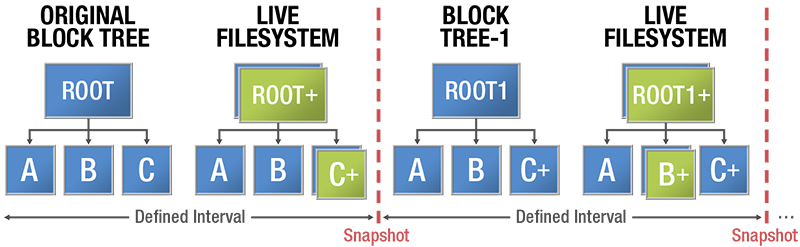
Figure 1
Copy-on-Write Technology
Furthermore, it can be cumbersome to restore VM’s and OS’s from ISOs, then restore the data from backups. This method of recovery is slow and fraught with error and potential inconsistencies. You may never be able to get data back from exactly where you were prior to the event.
Conversely, Nfina’s Snapshots can be cloned, tested, and rolled back with a click of a button at the Nfina-View orchestration layer. This allows one to restore snapshots in minutes (not hours or days it takes to restore systems from conventional backups).
Also, Nfina’s immutability backup snapshots are typically taken at the Lun or file-share level, meaning you don’t have to designate which files, folders, or VM’s you want to include. However, the restoration process level does provide the granularity to restore the VM, folder, or file, if you so desire.
In all Nfina clustered systems, the snapshots have completely programmable policies with respect to frequency and retention of the data that can be sent to multiple geo-redundant restoration locations simultaneously. In Nfina’s standard hybrid cloud offering, we recommend 4-way mirroring for both the on-prem and cloud production systems. Figure 2 below shows how in the geo-redundant Nfina hybrid cloud, 12 copies of data are stored any point-in-time a snapshot occurs. This redundancy provides 99.999% uptime and ensures that your IT Ecosystem can be recreated almost instantly when disaster strikes – when you need it the most.
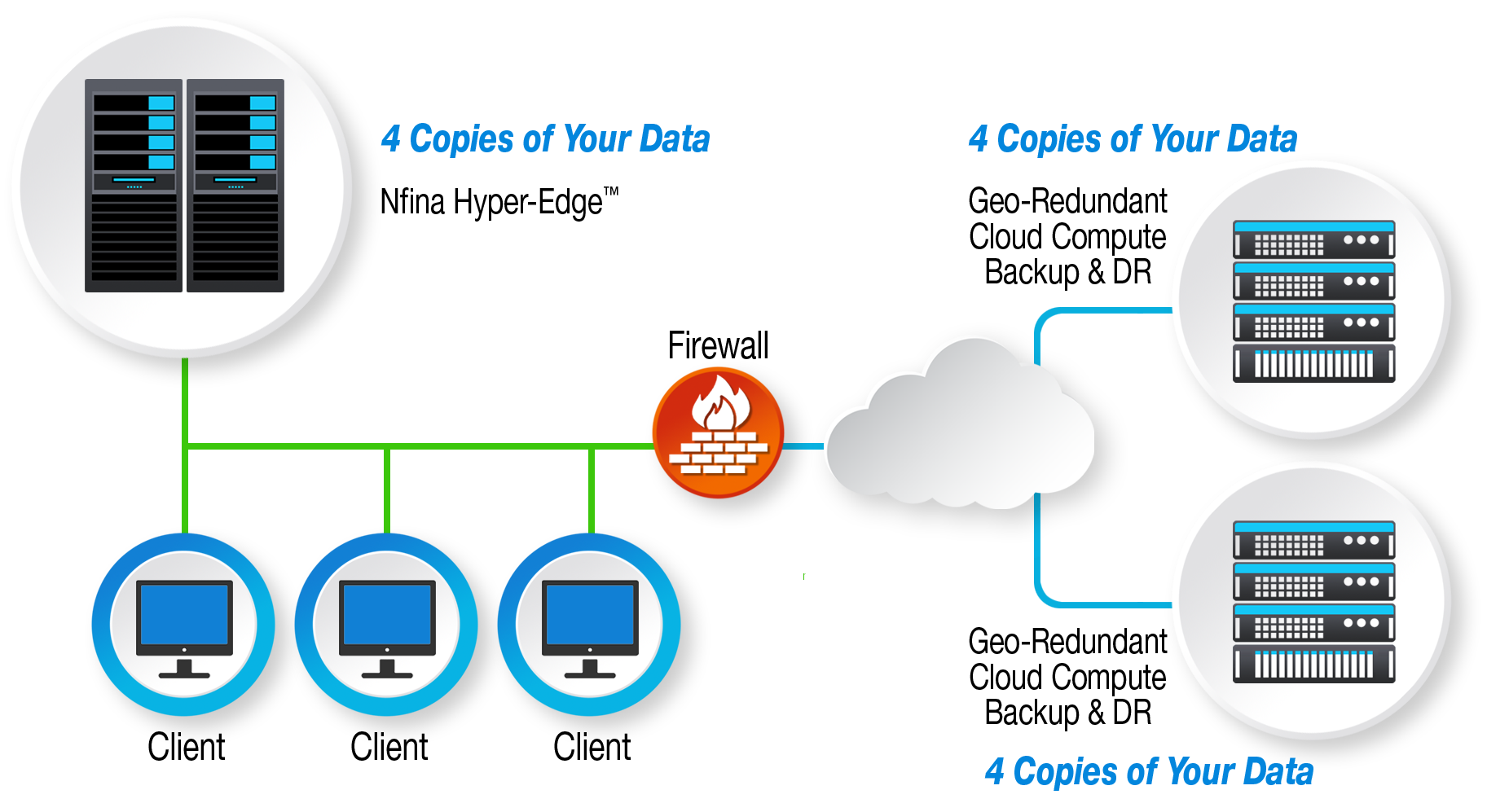
12 copies of your data, 4 copies on-prem and 4 copies at each geo-redundant cloud location
Choosing the Right Immutable Backup Solution for Your Business
When searching for an immutable backup solution, there are several factors to consider. First and foremost, you need to ensure that the solution offers a true immutability feature. This means that once a file or piece of data is backed up, it cannot be altered or deleted by anyone, including employees or hackers. This ensures that your backups remain intact and untampered with in case of an attack.
Another important aspect to consider is the level of security offered by the backup solution. Look for features such as encryption and multi-factor authentication to safeguard your backups from unauthorized access. Additionally, make sure that the provider has reliable disaster recovery plans in place so that even if their systems are compromised, your backups will still be accessible.
Scalability is another critical factor when choosing an immutable backup solution for your business. As your company grows, so does its data storage needs. It is vital to choose a solution that can handle large volumes of data without compromising on performance or security.
Integration capabilities should also be considered while selecting an immutable backup solution. Your chosen solution should seamlessly integrate with your existing infrastructure and applications to avoid disruptions in operations.
This characteristic ensures the integrity and reliability of the backup data, as it prevents any unauthorized changes or tampering. By making a backup immutable, organizations can protect their critical information from being compromised by malicious actors or accidental errors.
Being proactive in protecting your data against ransomware shows that you prioritize cybersecurity as a priority for yourself or your organization. It sends a message that you are serious about safeguarding confidential information and mitigating potential risks.
It is also wise to opt for a cloud-based immutable backup solution rather than traditional on-premise solutions. Cloud-based solutions offer greater flexibility and accessibility while providing higher levels of security against ransomware attacks.
Immutable backups provide a dependable recovery point, but they should be supported by a comprehensive backup and disaster recovery strategy. Combining protected backup copies with off-site replication, automated recovery procedures, routine testing, and clearly defined recovery objectives helps organizations restore critical applications and data more quickly after ransomware, equipment failure, human error, or a site-wide disruption.
What best practices can you implement to Maintain Immutable Backups?
1. Use a Dedicated Storage Device or Cloud Solution:
The first step in implementing an immutable backup solution is to use a dedicated storage device or cloud solution specifically designed for backups. This helps ensure that the backup data is not accessible to the same network as the original data, making it less vulnerable to ransomware attacks.
2. Enable Versioning:
Versioning allows you to keep multiple versions of your backups, ensuring that if one version becomes infected with ransomware, you can still restore from an earlier version. Make sure to regularly review and update your version settings to avoid running out of storage spaces
3. Automate Your Backup Process:
Manual backups are time-consuming and prone to human error. By automating your backup process, you can ensure that regular backups are taken without fail. This reduces the risk of gaps in backup coverage and ensures all critical data is protected.
4. Test Your Backups Regularly:
Regularly testing your backups is crucial in ensuring their reliability when needed. In addition to checking for errors or corrupted files, testing also ensures that your backup system is functioning correctly and can easily be restored in case of a real-life ransomware attack.
5. Keep Multiple Copies Offsite:
Having multiple copies of your backups stored offsite adds another layer of protection against ransomware attacks and other disasters such as fires or floods. This ensures that even if one location becomes compromised, you still have access to clean copies of your data.
6. Restrict Access to Backup Data:
Limiting access to backup data only to necessary personnel reduces the chances of accidental deletion or tampering by malicious actors within the organization who may have access to the network.
7. Implement Strong Access Controls:
To prevent unauthorized access to your backups, it is essential to implement strong access controls such as multi-factor authentication and regular password updates. This adds an extra layer of security and makes it more difficult for hackers to gain access.
8. Regularly Update Backup Software:
As with any other software, backup solutions also need to be regularly updated to stay current against new threats. Make sure to keep your backup software up-to-date and install any necessary patches or updates promptly.
View PDF