

Before designing a cluster, administrators should understand what Proxmox is and how its core technologies work together. Proxmox VE combines KVM-based virtual machines, Linux containers, software-defined networking, storage integration, live migration, and high-availability features within a centralized management platform.
A Proxmox cluster not only enhances resource management but also boosts availability and performance. Whether you’re in IT administration or just curious about advanced computing, understanding Proxmox clustering could be a game changer for your infrastructure strategy.
At Nfina, we have implemented Proxmox clustering for numerous clients across various industries. Our experience with this technology has been exceptional, and we have seen significant results in terms of improved performance, scalability, and reliability.
What is a Proxmox Cluster?
The Proxmox cluster integrates several servers, also called nodes, and creates them into one unit. This makes it easier to manage multiple virtual machines and containers across all servers. They can talk to and share resources with each other, which increases efficiency and performance and makes the system more fault resistant to hardware failures.
Pooling resources also means the cluster can even out the load and keep user traffic smooth. Control flows from the many nodes to a single administrator. This makes it easier to manage backups or install updates. Clustered setups allow for high availability. If one of the nodes goes down, the remaining nodes can take over without any disruption.
Clustering enhances business continuity by providing backup and disaster recovery options which help minimize downtime in case of an unexpected outage.
What are the Benefits of Using a Proxmox Cluster?
A Proxmox cluster offers remarkable scalability. You can easily add more nodes as your resource needs grow, ensuring that your infrastructure evolves with your business.
Improved Performance:
One of the major benefits of using a Proxmox cluster is its ability to improve system performance. By distributing workloads across multiple nodes, the load on each individual server is reduced, leading to faster response times and improved overall performance. Additionally, Proxmox utilizes cutting-edge technologies such as KVM virtualization and Ceph storage that allow for better utilization of resources and optimize performance.
High Availability:
Proxmox clusters also offer high availability (HA), meaning that if one node fails or experiences issues, another node can take over seamlessly without interrupting service. This ensures minimal downtime and maximum availability for critical applications and services running on the cluster. With HA enabled in a Proxmox cluster, organizations can rest assured that their systems will continue functioning even in case of hardware failures or maintenance activities.
A Proxmox cluster should be designed as part of a broader high-availability infrastructure strategy. Redundant nodes, storage, network paths, power supplies, backups, and off-site protection help prevent individual component failures from interrupting access to critical virtual machines and applications.
High availability does not replace a complete backup and disaster recovery strategy. Although a Proxmox cluster can restart or migrate workloads after a node failure, independent backups, immutable recovery points, off-site copies, and regular restoration testing are still needed to protect against corruption, ransomware, accidental deletion, and site-wide outages.
Scalability:
Another significant advantage of using a Proxmox cluster is its scalability feature. As businesses grow and their computing needs increase, they can easily add more nodes to their existing clusters to accommodate the additional workload without disrupting ongoing operations. This flexibility makes it an ideal solution for businesses with fluctuating resource demands or those looking to scale up their operations quickly.
Cost-Effectiveness:
Proxmox clusters are highly cost-effective compared to other solutions available in the market. With traditional virtualization platforms requiring expensive licensing fees per CPU core or socket along with additional costs for support services, Proxmox offers an open-source alternative that eliminates these costs entirely. Moreover, by consolidating multiple physical servers into a single cluster, organizations can save on hardware and maintenance costs.
Organizations evaluating a new virtualization cluster should compare Proxmox and VMware across licensing, storage integration, management, high availability, live migration, performance, and support requirements. Proxmox provides an open-source alternative that can reduce licensing expenses while retaining many of the capabilities required for enterprise virtualization.
How Does a Proxmox Cluster Work?
A Proxmox cluster is a group of interconnected servers or nodes that work together to provide a highly available and scalable environment for running VMs and containers. It utilizes shared storage resources, such as network file systems (NFS) or storage area networks (SAN), to allow multiple nodes to access the same data simultaneously.
The key component of a Proxmox cluster is the Corosync messaging layer, which enables communication between the nodes in the cluster. This ensures that all nodes are aware of each other’s status and can coordinate their actions accordingly.
To start setting up a Proxmox cluster, you first need to have two or more physical servers with Proxmox installed. These servers should have similar hardware specifications for optimal performance. Additionally, they should be connected via a high-speed network for efficient communication.
Production clusters should be built on reliable, virtualization-ready servers configured for the intended workload. Processor core count, memory capacity, redundant networking, SSD or NVMe performance, expansion options, and enterprise drive endurance should all be evaluated before selecting hardware for Proxmox nodes.
The next step is to configure the shared storage resource that will be used by all the nodes in the cluster. This can be either an NFS share or iSCSI target from a SAN device. The shared storage serves as a central repository for storing all VM images, templates, ISO files, and other data required by the cluster.
A Proxmox cluster can use SAN storage solutions to provide multiple nodes with centralized access to virtual machine disks, templates, ISO files, and application data. Shared block storage can support workload mobility, centralized capacity management, high availability, and faster recovery when a physical node becomes unavailable.
Once the shared storage has been set up, you can begin configuring your Proxmox cluster using its built-in web-based interface called “PVE Cluster Manager.” The first node acts as the master node responsible for managing all operations within the cluster. You then add additional nodes using their IP addresses or hostnames through PVE Cluster Manager.
After adding all desired nodes, you must join them together into one cohesive unit using Corosync and Pacemaker tools provided by Proxmox. These tools allow for automatic failover in case of node failure and enable the cluster to distribute workloads evenly among the nodes.
In a Proxmox cluster, all VMs and containers are highly available by default. This means that if one node fails, all its running VMs will be automatically migrated to another healthy node without any downtime or disruption to services.
What are Nodes and Resources?
On Proxmox clusters, each server (node) is part of the overall system, and each can run some virtual machines and containers to share resources. This can help create optimum hardware utilization.
Resources may include CPU, RAM, storage, and network bandwidth, and system-wide resource sharing enables the system to distribute workloads efficiently. To achieve optimal performance, system administrators need to understand how the nodes communicate. Other nodes can jump in to do the work of a node crash/failure if that node is overused.
To help ensure that apps are, in fact, always available, this sort of system-wide resource sharing will be of use. System reconfigurations can be reduced by node additions, as this increases system-wide demand.
When moving VMware virtual machines into a Proxmox cluster, administrators may need to convert VMDK to QCOW2. Proper conversion, backup verification, storage selection, and post-import testing help ensure that virtual disks remain usable and perform correctly in the new KVM-based environment.
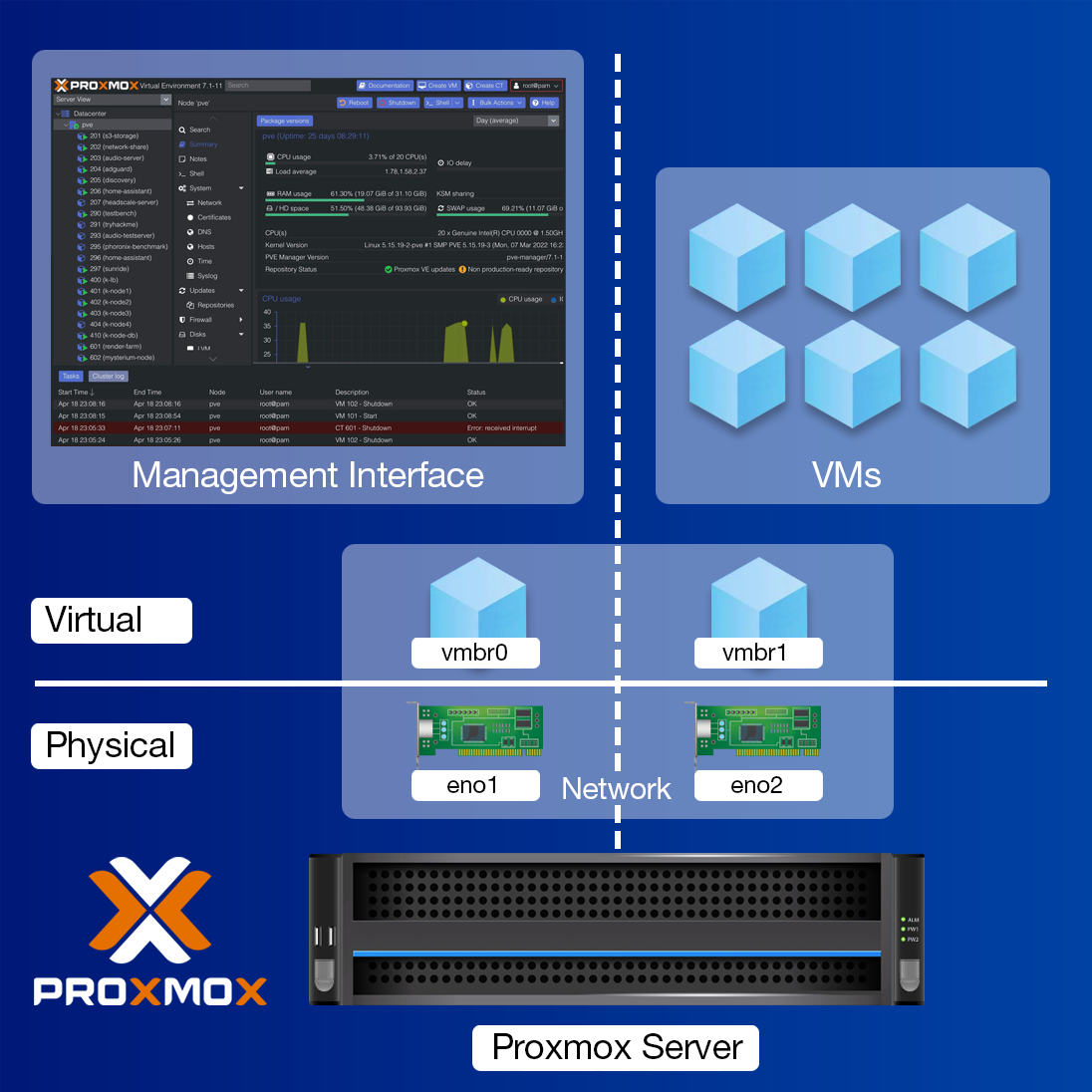
Hardware Requirements and Recommendations
- Intel 64 or AMD64 with Intel VT/AMD-V CPU flag.
- Memory, minimum 2 GB for OS and Proxmox VE services. Plus designated memory for guests. For Ceph or ZFS additional memory is required, approximately 1 GB memory for every TB used storage.
- Fast and redundant storage, best results with SSD disks.
- OS storage: Hardware RAID with batteries protected write cache (“BBU”) or non-RAID with ZFS and SSD cache.
- VM storage: For local storage use a hardware RAID with battery backed write cache (BBU) or non-RAID for ZFS. Neither ZFS nor Ceph are compatible with a hardware RAID controller. Shared and distributed storage is also possible.
- Redundant Gbit NICs, additional NICs depending on the preferred storage technology and cluster setup – 10 Gbit and higher is also supported.
- For PCI(e) passthrough a CPU with VT-d/AMD-d CPU flag is needed.
Consider redundancy as well; implementing RAID configurations can safeguard against data loss while providing better performance under load. Make sure your hardware is compatible with the latest Proxmox VE version to avoid any compatibility issues during installation or upgrades.
Storage design has a significant effect on cluster performance and availability. Reviewing an enterprise storage architecture can help administrators determine whether their Proxmox environment should use local ZFS storage, shared block storage, file storage, or a highly available storage cluster. The correct configuration depends on workload performance, redundancy, capacity, and recovery requirements.
How do you set up a Proxmox Cluster?
Setting up a Proxmox cluster requires careful planning. Start by ensuring your hardware meets the necessary specifications. This includes having compatible CPUs, sufficient RAM, and reliable storage solutions.
Next, install Proxmox Virtual Environment (VE) on each node. The installation process is straightforward and user-friendly. Follow the prompts to configure networking settings that suit your environment.
Once installed, it’s time to add nodes to your cluster. Use the web interface or command line for this task. Ensure all nodes can communicate with one another effectively.
Monitor resource allocation as you set up virtual machines across the nodes. Proper distribution enhances performance and reliability in your cluster environment.
Pay attention to backups during this phase too; they are crucial for data integrity as you expand resources within your Proxmox setup.
How do you add Nodes to a cluster?
Adding nodes to a Proxmox cluster enhances its capabilities and scalability. It’s an essential step if you want to grow your infrastructure.
Ensure that the new node meets all hardware requirements. Consistency in specifications across nodes can prevent performance issues down the line.
Next, install Proxmox VE on the new server. The installation should mirror existing cluster nodes for seamless integration. Once installed, configure network settings correctly to facilitate smooth communication between all nodes. Proper networking ensures that resources are shared efficiently.
Utilize the command-line interface or web GUI to add the node to your existing cluster. This process involves joining it via unique identifiers and confirming connectivity with other members of the cluster.
Monitoring tools within Proxmox will help keep tabs on resource allocations post-addition, ensuring optimal performance as you expand your setup further.
How to remove a Node from a Proxmox Cluster?
Removing a node from a Proxmox cluster can be necessary for various reasons, including hardware failure or upgrades. Understanding the process is crucial to maintaining cluster integrity.
Before initiating removal, always ensure that no critical tasks are running on the node. Migrating virtual machines and storage resources should be your first step—this helps prevent data loss.
Once you’ve confirmed everything is in order, access the Proxmox web interface. Locate the node you wish to remove under the “Datacenter” section. A simple right-click will lead you to options where you can select “Remove.”
The system may prompt you with warnings regarding dependencies or active services. Take care of these alerts before proceeding, as they highlight potential issues that could arise after removal.
After confirming your action, watch as Proxmox updates its configuration automatically, ensuring other nodes remain synchronized and operational within the cluster environment.
Nfina’s Experience with Proxmox Clustering
Nfina is a leading managed IT services provider, offering a wide range of solutions to businesses of all sizes. With over 15 years of experience in the industry, Nfina has developed a deep understanding and expertise in virtualization technologies. One such technology that we have successfully implemented for our clients is Proxmox Clustering.
Unlike other proprietary HA solutions that require expensive licenses and specialized hardware configurations, Proxmox uses standard server hardware and open-source software components. This reduces overall IT costs while still providing enterprise-level HA capabilities.
In addition to these benefits, our experience with Proxmox clustering has also shown us how easy it is to manage this architecture through its user-friendly web interface. The interface provides a centralized management console, making it convenient for us to monitor and manage the cluster’s resources, virtual machines, and storage from one place.
Proxmox aligns well with Nfina’s commitment to innovation and cost-effectiveness. We appreciate the robust community support that comes with using such a popular platform. This not only helps us troubleshoot issues but also keeps us updated on best practices and new features. Make the switch and migrate VMware to Proxmox today