

IOPS (Input/Output Operations Per Second) measures the number of read and write operations a storage system can complete each second. Higher IOPS generally indicates greater performance for workloads involving many small, random requests, such as databases and virtualization, but IOPS should be evaluated alongside throughput and latency.
What does IOPS stand for?
IOPS refers to the number of input/output operations that a storage device can perform in one second. In simpler terms, it measures how quickly data can be transferred to and from the storage device. This includes both read operations (when data is retrieved from the storage) and write operations (when data is saved onto the storage).
The importance of IOPS lies in its direct correlation to the speed and efficiency of accessing data stored on a device. The higher the IOPS, the faster a storage device can process requests for data, resulting in better overall performance.
If you’re wondering how to calculate IOPS (Input/Output Operations Per Second), it’s important to first understand the formula for determining this crucial performance metric. To calculate IOPS, you need to divide the total number of input/output operations by the time taken to perform those operations.
The IOPS calculator formula is expressed as: IOPS = Total IO Operations / Time Taken (in seconds). To get an accurate measurement, make sure to include all read and write operations that your storage system processes within a specific timeframe. This includes both random and sequential data access patterns. By calculating IOPS, you can gauge the efficiency and capacity of your storage system, helping you optimize its performance for better overall productivity.
Why is IOPS an Important Metric for Storage Performance?
One might wonder why IOPS is such an important metric for storage performance. The answer lies in its direct impact on overall system performance and user experience. Let’s delve into some key reasons why IOPS should be taken seriously when evaluating storage systems.
Firstly, IOPS directly affects application response time. When applications are running, they require data from the storage system to process and execute tasks efficiently. If the IOPS rate is low, it means that data transfer between the application and the storage device will be slow, resulting in longer wait times for users. This can lead to frustration and decreased productivity.
Secondly, IOPS plays a significant role in determining the scalability of a storage system. As businesses grow and generate more data, their storage needs also increase. A high IOPS rate ensures that multiple applications can access data simultaneously without any delays or bottlenecks. This allows organizations to expand their operations without worrying about lagging systems hindering their growth.
Another crucial aspect where IOPS proves its importance is in virtualized environments. In virtualization technology, multiple virtual machines (VMs) share resources from a single physical server or cluster. These VMs rely heavily on fast access to data from shared storage devices for efficient operation. With higher IOPS rates, these VMs can retrieve data faster and run various workloads without disrupting each other’s performance.
Moreover, as we move towards cloud-based infrastructures where large amounts of data are stored remotely on servers accessed over networks with varying speeds and bandwidths; having high IOPS rates becomes even more critical for smooth functioning of applications.
What is the difference between IOPS vs Throughput vs Latency?
| Metric | Measures | Typical Unit | Most Important For |
|---|---|---|---|
| IOPS | Number of operations | IOPS | Databases, VDI, VMs |
| Throughput | Data volume transferred | MB/s or GB/s | Backups, streaming, large files |
| Latency | Time for an operation | ms / μs | Transaction-sensitive applications |
Many people often confuse IOPS with throughput, assuming that they are interchangeable terms. While both metrics are related to storage performance, they measure different aspects and should not be considered synonymous.
To put it simply, IOPS measures the number of input/output operations that can be performed by a storage device in one second. This includes both read and write operations. On the other hand, throughput refers to the amount of data that can be transferred from a storage device within a given time frame.
The difference between these two metrics becomes more apparent when we consider their units of measurement. IOPS is typically measured in thousands (K), millions (M), or even billions (G) per second, while throughput is measured in bytes per second (Bps) or bits per second (bps). One way to understand the relationship between IOPS and throughput is to think of them as speed versus capacity. IOPS represents how fast data can be retrieved from or written to a storage device, while throughput indicates how much data can be transferred at once.
For example, let’s say you have two solid-state drives (SSDs), one with an IOPS rating of 100K and another with an IOPS rating of 200K. This does not necessarily mean that the SSD with 200K IOPS will always outperform the other one. The actual performance will also depend on factors such as file size and type.
On the other hand, if we compare two HDDs with identical capacities but different throughputs – let’s say 100MBps and 200MBps – then the latter will have faster transfer speeds than the former. Another important factor to note is that while higher IOPS generally translates to better performance for random access workloads – where data is accessed randomly from different locations on the storage device – it may not have a significant impact on sequential workloads, where data is accessed in a sequential manner.
While IOPS and throughput are both important metrics for measuring storage performance, they measure different aspects of it. Understanding the difference between these two terms is crucial for making informed decisions when selecting storage devices for your system. So, make sure to consider both IOPS and throughput when choosing storage solutions that best suit your specific needs.
Eight Factors That Affect IOPS
There are several key factors that can affect IOPS and understanding these factors can help users make informed decisions about their storage solutions’
1. Storage Device Type:
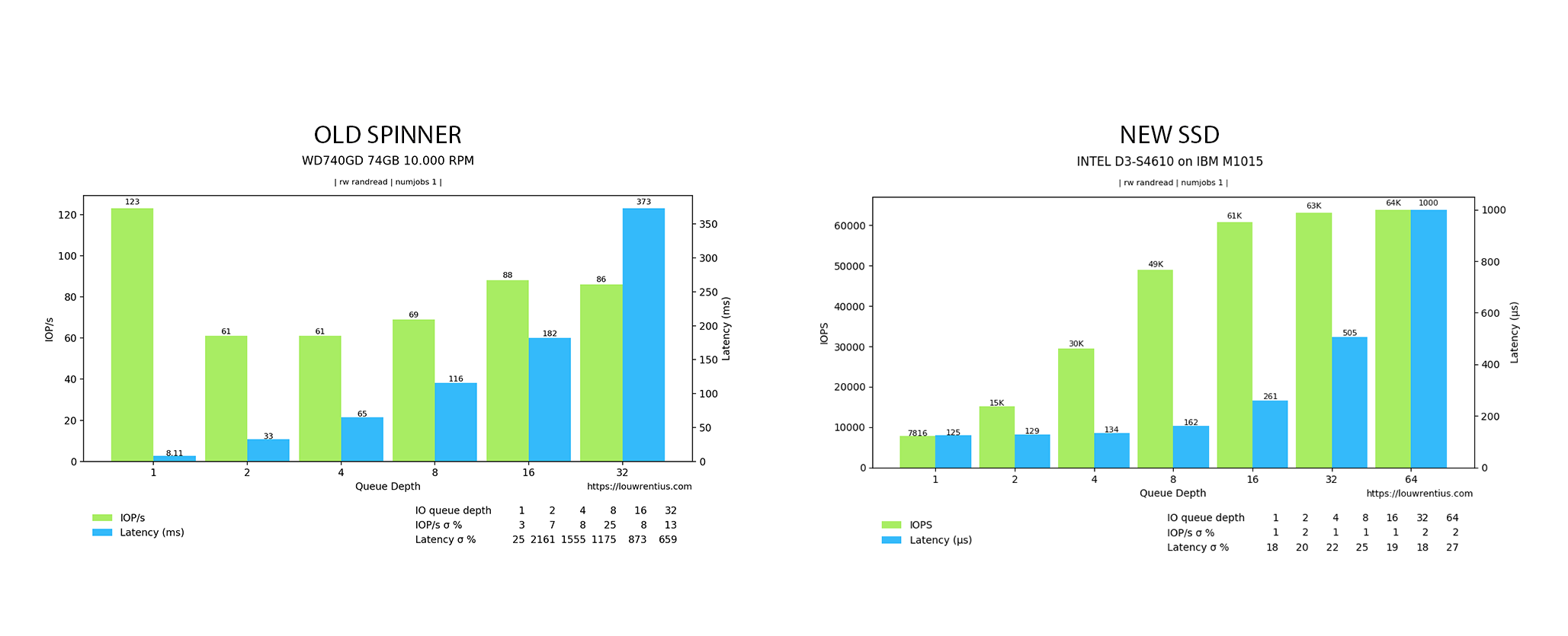
Not all hard drives are created equal. HDDs generally deliver hundreds of random IOPS per drive, while modern SSDs can deliver tens or hundreds of thousands—and high-performance NVMe devices can reach into the millions under appropriate workloads and queue depths.
2. Interface Speed:
The interface speed between the storage device and the computer also plays a role in IOPS. For example, SATA (Serial Advanced Technology Attachment) interfaces typically have slower speeds than NVMe (Non-Volatile Memory Express) interfaces, resulting in lower IOPS for SATA-based devices.
3. Queue Depth:
Queue depth refers to the number of outstanding input/output requests that can be handled by a storage device at any given time. The higher the queue depth, the more simultaneous operations can be processed, leading to higher IOPS. This is particularly important in high-demand applications such as databases or virtualization environments.
4. Workload:
The type and amount of workload being processed by a system will also impact on its IOPS requirements. Applications with heavy workloads such as databases or virtual machines will require higher IOPS for optimal performance.
Random workloads with small block sizes tend to require more input/output operations compared to sequential workloads with larger block sizes.
5. Block Size:
The size of data blocks being transferred can also affect IOPS. Smaller block sizes typically result in higher IOPS, but larger block sizes may be more efficient for certain workloads.
6. File System:
The file system used on a storage device can also affect its IOPS performance. Different file systems have varying levels of overhead and organization methods which can impact how quickly data can be accessed and written onto the drive.
7. RAID Configuration:
The way data is distributed and stored across multiple drives in a RAID (Redundant Array of Independent Disks) configuration can affect IOPS performance. For example, RAID 0 striping offers increased read/write speeds but at the expense of data redundancy, while RAID 5 or 6 configurations provide data protection but with lower IOPS compared to RAID 0.
What are Block Sizes?
Block size is one of the most important variables affecting IOPS, yet it is easy for readers to overlook. An IOPS figure by itself does not tell the full story because storage performance can change dramatically depending on the size of each I/O request.
In general, smaller block sizes produce higher IOPS, while larger block sizes produce greater throughput but fewer operations per second. For example, a storage system handling 4 KB database transactions may report a much higher IOPS figure than the same system processing large 1 MB sequential files.
100,000 random-read IOPS using 4 KB blocks at a specified queue depth.
Block size also connects IOPS directly to throughput:
Throughput = IOPS × Block Size
For example, 100,000 IOPS using 4 KB blocks represents approximately 400 MB/s of data transfer before accounting for protocol overhead and other system factors.
The ideal block size depends on the workload. Databases, virtual machines, and transactional applications often generate many small I/O requests, making IOPS particularly important. Backups, video files, and large sequential transfers generally use larger blocks, making throughput a more useful performance metric.
Because of this relationship, organizations should avoid comparing storage systems based on headline IOPS numbers alone. Block size, read/write ratio, access pattern, queue depth, and latency should all be considered when evaluating real-world storage performance.
How do you Measure and Calculate IOPS?
OPS can be calculated in several ways depending on whether you are measuring actual storage activity or estimating performance from other storage metrics. Understanding these formulas makes it easier to compare storage systems and determine whether they can support a particular workload.
Basic IOPS Formula
The simplest way to calculate measured IOPS is:
IOPS = Total I/O Operations ÷ Time in Seconds
For example, if a storage system completes 500,000 read and write operations over 10 seconds:
500,000 ÷ 10 = 50,000 IOPS
This means the storage system completed an average of 50,000 input/output operations per second during the measurement period.
Calculating Throughput from IOPS
IOPS and throughput are closely related, but they measure different aspects of storage performance. IOPS measures the number of operations performed each second, while throughput measures the amount of data transferred.
The relationship can be expressed as:
Throughput = IOPS × Block Size
For example, a storage system performing 100,000 IOPS with a 4 KB block size would have a theoretical throughput of:
100,000 × 4 KB = 400,000 KB/s
That is approximately 400 MB/s of throughput before accounting for protocol overhead and other system factors.
If the same system performs 100,000 IOPS using larger blocks, the amount of data transferred per second increases significantly. This is why an IOPS number should always be evaluated together with the block size used during testing.
Calculating IOPS from Throughput
You can also estimate IOPS when throughput and block size are known:
IOPS = Throughput ÷ Block Size
For example, if a storage system delivers approximately 800 MB/s while processing 8 KB blocks, its theoretical IOPS would be approximately:
800 MB/s ÷ 8 KB ≈ 100,000 IOPS
When making this calculation, make sure the throughput and block-size measurements use compatible units.
Why IOPS Calculations Are Only Part of the Picture
Calculated IOPS provides a useful reference point, but real-world storage performance depends on more than a mathematical formula. Benchmark results can vary considerably depending on factors such as:
- Block size
- Random vs. sequential I/O
- Read/write ratio
- Queue depth
- Storage media and interface
- RAID configuration
- Caching
- Latency
- Number of concurrent workloads
For this reason, two storage systems advertising the same IOPS rating may perform very differently under actual application workloads.
When comparing storage performance, look beyond the headline IOPS number. A useful benchmark should identify the block size, read/write mix, access pattern, queue depth, throughput, and latency associated with the result. This provides a much more accurate picture of how the storage system is likely to perform in a real-world environment.
Now that we understand these key factors influencing IOPS measurements let’s look at how we can calculate them accurately. The most common way is by performing benchmark tests using specialized software designed for measuring storage performance such as Iometer, CrystalDiskMark or ATTO Disk Benchmark.
How to Improve IOPS
Here are some tips on how you can improve IOPS and enhance your storage performance:
1. Invest in Solid-State Drives (SSDs):
Not all hard drives are created equal. Traditional hard disk drives (HDDs) have limited IOPS capabilities compared to SSDs. SSDs use flash memory instead of spinning disks, allowing them to perform much faster. In fact, an average HDD can handle up to 200 IOPS while an average SSD can handle up to 100,000 IOPS.
2. Implement RAID:
Redundant Array of Independent Disks (RAID) is a method of combining multiple physical drives into one logical unit for improved performance and redundancy. By distributing workload across multiple drives, RAID can significantly increase the overall IOPS of a system.
3. Utilize Caching Technologies:
Caching involves storing frequently accessed data in temporary high-speed memory for quicker retrieval. This reduces reliance on slower primary storage devices and improves overall performance by increasing the number of available IOPS.
4. Optimize Workloads:
Certain workloads such as database operations or virtualization require high levels of random-access reads/writes which can put a strain on your storage infrastructure and reduce overall IOPS hard drive capacity. It is important to properly configure these workloads and distribute them evenly across different physical disks or arrays.
5. Fine-Tune Your Storage Architecture:
Having a well-designed storage architecture that considers factors such as disk types, array configuration, caching techniques, etc., plays a crucial role in optimizing IOPS performance
6. Monitor Performance Metrics:
Keep track of your IOPS metrics regularly to identify any performance bottlenecks and take necessary actions. This will help you pinpoint the areas that need improvement and make informed decisions for optimizing IOPS.
What are the limitations of IOPS?
Solely relying on IOPS can be misleading and limit the comprehensive evaluation of storage systems. In this section, we will discuss the limitations of using IOPS as a sole performance metric and highlight other factors that should also be taken into account.
One of the major limitations of using IOPS as the only performance metric is that it does not take into consideration the size or complexity of each operation. This means that two systems with the same number of IOPS may have vastly different capabilities when it comes to handling larger or more complex operations. For example, an all-flash array may have a higher number of IOPS compared to a traditional hard disk drive (HDD), but it may struggle when dealing with large sequential reads or writes due to its smaller block sizes.
Moreover, IOPS alone cannot provide insight into latency or response time. A system may have high IOPS, but if its response time is slow, it can lead to poor overall performance. This is especially crucial for applications that require consistent and low latency such as databases or virtual desktop infrastructure (VDI). In such cases, focusing solely on IOPS can result in inadequate performance evaluation.
Another factor that needs to be considered is data protection mechanisms such as RAID levels and data replication. These mechanisms can significantly impact storage performance by affecting both read and write operations. While they are essential for ensuring data availability and integrity, they also come at a cost in terms of reduced overall performance.
In addition to technical limitations, there are also practical considerations when it comes to using IOPS as a primary metric for storage performance. The workload type plays a crucial role in determining how many IOPS are required for optimal system functioning. For instance, random workloads tend to generate more small-sized operations which require higher numbers of IOPS compared to sequential workloads that involve larger operations.
What Is a Good IOPS Number?
There is no single IOPS number that is considered “good” for every storage system or application. The right level of IOPS depends on the workload, block size, read/write ratio, access pattern, queue depth, number of users, and acceptable latency.
For example, workloads such as transactional databases, virtual machines, virtual desktop infrastructure (VDI), and ERP systems often generate large numbers of small, random I/O requests. These applications generally benefit from higher IOPS and lower latency. By contrast, backups, video files, and large sequential transfers may depend more heavily on throughput than on maximum IOPS.
The type of storage media also affects what should be considered normal performance. Traditional hard disk drives typically provide far fewer random IOPS than SSDs because HDDs rely on mechanical components to locate and access data. SSDs eliminate this mechanical delay, while NVMe-based storage can provide substantially higher IOPS and lower latency by using a faster, highly parallel interface.
Rather than evaluating storage by a headline IOPS number alone, organizations should determine how much performance their actual applications require. Important factors include:
- Block size: Smaller I/O requests generally allow more operations per second.
- Read/write ratio: Read-heavy and write-heavy workloads can produce different performance results.
- Random vs. sequential access: Random workloads are typically more demanding than sequential workloads.
- Queue depth: More outstanding I/O requests can increase measured IOPS, depending on the storage system.
- Latency: High IOPS is less valuable if individual requests take too long to complete.
- Concurrent workloads: Multiple applications, users, or virtual machines can increase overall I/O demand.
- Peak usage: Storage should be sized to handle periods of high activity, not just average demand.
For this reason, a “good” IOPS number is one that allows the storage system to meet the workload’s performance requirements without creating unacceptable latency or bottlenecks during peak demand.
IOPS FAQs
What does IOPS stand for?
IOPS stands for Input/Output Operations Per Second. It measures how many individual read and write operations a storage device or storage system can complete in one second.
Is higher IOPS always better?
Not necessarily. Higher IOPS can indicate better performance for workloads that involve many small, random read and write requests, such as databases, virtual machines, and VDI environments. However, IOPS should always be evaluated alongside latency, throughput, block size, queue depth, and workload type. A system with very high IOPS may not provide the best performance for workloads that depend primarily on large sequential transfers.
What is a good IOPS number?
There is no single IOPS number that is considered good for every application. The required IOPS depends on the workload, number of users, read/write ratio, block size, access pattern, queue depth, and acceptable latency.
Transactional databases and virtualized environments may require high IOPS, while backups and large file transfers may depend more heavily on throughput. The best approach is to determine the performance requirements of the actual workload rather than compare systems using headline IOPS figures alone.
What is the difference between IOPS and MB/s?
IOPS measures the number of storage operations completed per second, while MB/s measures the amount of data transferred per second.
The two metrics are related through block size:
Throughput = IOPS × Block Size
For example, 100,000 IOPS using 4 KB blocks represents approximately 400 MB/s of theoretical throughput. Larger block sizes can produce higher throughput even when the number of operations per second remains the same.
How does block size affect IOPS?
Block size refers to the amount of data transferred during each I/O operation. In general, smaller blocks allow a storage system to perform more individual operations per second, resulting in higher IOPS. Larger blocks transfer more data with each operation, which can increase throughput while reducing the number of operations completed per second.
Because of this relationship, IOPS benchmarks should always specify the block size used during testing.
How does latency affect IOPS?
Latency measures how long it takes a storage system to respond to and complete an I/O request. Lower latency allows operations to finish more quickly and can help a system sustain higher IOPS, particularly in transaction-heavy workloads.
A high IOPS rating combined with high latency may still result in poor application responsiveness. For this reason, IOPS and latency should be evaluated together when measuring storage performance.
How do you test storage IOPS?
Storage IOPS is typically measured with benchmarking tools that generate controlled read and write workloads. Common tools include fio (Flexible I/O Tester) and Iometer.