

At the heart of measuring storage performance lies one key metric: IOPS. In this blog post, we will delve into the intricacies of IOPS – what it is, how it impacts your storage systems, and why understanding this metric is crucial IOPS for maximizing your system’s capabilities.
The Meaning of IOPS
IOPS (Input/Output Operations Per Second) measures how many read and write operations a storage device or system can complete each second. It’s a core performance metric—especially for data-intensive applications like databases and multimedia processing—but should be considered alongside throughput and latency for a full picture. Input/output (I/O) is how computers communicate with the outside world and includes audio, software, storage, text, and video transmissions. This metric provides an important measure of how fast a storage device can read and write data, which ultimately affects its overall performance.
IOPS refers to the number of input/output operations that a storage device can perform in one second. In simpler terms, it measures how quickly data can be transferred to and from the storage device. This includes both read operations (when data is retrieved from the storage) and write operations (when data is saved onto the storage).
The importance of IOPS lies in its direct correlation to the speed and efficiency of accessing data stored on a device. The higher the IOPS, the faster a storage device can process requests for data, resulting in better overall performance.
If you’re wondering how to calculate IOPS (Input/Output Operations Per Second), it’s important to first understand the formula for determining this crucial performance metric. To calculate IOPS, you need to divide the total number of input/output operations by the time taken to perform those operations.
The IOPS calculator formula is expressed as: IOPS = Total IO Operations / Time Taken (in seconds). To get an accurate measurement, make sure to include all read and write operations that your storage system processes within a specific timeframe. This includes both random and sequential data access patterns. By calculating IOPS, you can gauge the efficiency and capacity of your storage system, helping you optimize its performance for better overall productivity.
Why IOPS is an Important Metric for Storage Performance
One might wonder why IOPS is such an important metric for storage performance. The answer lies in its direct impact on overall system performance and user experience. Let’s delve into some key reasons why IOPS should be taken seriously when evaluating storage systems.
Firstly, IOPS directly affects application response time. When applications are running, they require data from the storage system to process and execute tasks efficiently. If the IOPS rate is low, it means that data transfer between the application and the storage device will be slow, resulting in longer wait times for users. This can lead to frustration and decreased productivity.
Secondly, IOPS plays a significant role in determining the scalability of a storage system. As businesses grow and generate more data, their storage needs also increase. A high IOPS rate ensures that multiple applications can access data simultaneously without any delays or bottlenecks. This allows organizations to expand their operations without worrying about lagging systems hindering their growth.
Another crucial aspect where IOPS proves its importance is in virtualized environments. In virtualization technology, multiple virtual machines (VMs) share resources from a single physical server or cluster. These VMs rely heavily on fast access to data from shared storage devices for efficient operation. With higher IOPS rates, these VMs can retrieve data faster and run various workloads without disrupting each other’s performance.
Moreover, as we move towards cloud-based infrastructures where large amounts of data are stored remotely on servers accessed over networks with varying speeds and bandwidths; having high IOPS rates becomes even more critical for smooth functioning of applications.
IOPS is a crucial metric for storage performance as it directly impacts application response time, scalability, and virtualization technology. It also plays a vital role in ensuring the efficient functioning of cloud-based systems. Therefore, businesses must carefully consider IOPS rates when selecting storage systems to ensure optimal performance and user experience.
IOPS vs Throughput
Many people often confuse IOPS with throughput, assuming that they are interchangeable terms. While both metrics are related to storage performance, they measure different aspects and should not be considered synonymous.
To put it simply, IOPS measures the number of input/output operations that can be performed by a storage device in one second. This includes both read and write operations. On the other hand, throughput refers to the amount of data that can be transferred from a storage device within a given time frame.
The difference between these two metrics becomes more apparent when we consider their units of measurement. IOPS is typically measured in thousands (K), millions (M), or even billions (G) per second, while throughput is measured in bytes per second (Bps) or bits per second (bps). One way to understand the relationship between IOPS and throughput is to think of them as speed versus capacity. IOPS represents how fast data can be retrieved from or written to a storage device, while throughput indicates how much data can be transferred at once.
For example, let’s say you have two solid-state drives (SSDs), one with an IOPS rating of 100K and another with an IOPS rating of 200K. This does not necessarily mean that the SSD with 200K IOPS will always outperform the other one. The actual performance will also depend on factors such as file size and type.
On the other hand, if we compare two HDDs with identical capacities but different throughputs – let’s say 100MBps and 200MBps – then the latter will have faster transfer speeds than the former. Another important factor to note is that while higher IOPS generally translates to better performance for random access workloads – where data is accessed randomly from different locations on the storage device – it may not have a significant impact on sequential workloads, where data is accessed in a sequential manner.
While IOPS and throughput are both important metrics for measuring storage performance, they measure different aspects of it. Understanding the difference between these two terms is crucial for making informed decisions when selecting storage devices for your system. So, make sure to consider both IOPS and throughput when choosing storage solutions that best suit your specific needs.
Eight Factors That Affect IOPS
There are several key factors that can affect IOPS and understanding these factors can help users make informed decisions about their storage solutions.
1. Storage Device Type: Not all hard drives are created equal. The type of storage device being used has a significant impact on IOPS. Traditional hard disk drives (HDDs) typically have lower IOPS compared to solid-state drives (SSDs). This is because HDDs rely on mechanical components to read and write data, while SSDs use flash memory technology which allows for faster access speeds.
2. Interface Speed: The interface speed between the storage device and the computer also plays a role in IOPS. For example, SATA (Serial Advanced Technology Attachment) interfaces typically have slower speeds than NVMe (Non-Volatile Memory Express) interfaces, resulting in lower IOPS for SATA-based devices.
3. Queue Depth: Queue depth refers to the number of outstanding input/output requests that can be handled by a storage device at any given time. The higher the queue depth, the more simultaneous operations can be processed, leading to higher IOPS. This is particularly important in high-demand applications such as databases or virtualization environments.
4. Workload: The type and amount of workload being processed by a system will also impact on its IOPS requirements. Applications with heavy workloads such as databases or virtual machines will require higher IOPS for optimal performance.
5. Block Size: The size of data blocks being transferred can also affect IOPS. Smaller block sizes typically result in higher IOPS, but larger block sizes may be more efficient for certain workloads.
6.File S ystem: The file system used on a storage device can also affect its IOPS performance. Different file systems have varying levels of overhead and organization methods which can impact how quickly data can be accessed and written onto the drive.
7. Workload Type: The type of workload being performed also has an impact on IOPS. Random workloads with small block sizes tend to require more input/output operations compared to sequential workloads with larger block sizes. For example, database applications with frequent random reads and writes will have a higher IOPS demand than video streaming applications.
8. RAID Configuration: The way data is distributed and stored across multiple drives in a RAID (Redundant Array of Independent Disks) configuration can affect IOPS performance. For example, RAID 0 striping offers increased read/write speeds but at the expense of data redundancy, while RAID 5 or 6 configurations provide data protection but with lower IOPS compared to RAID 0.
Block Sizes
Block sizes play a crucial role in the performance of Input/Output Operations Per Second (IOPS), serving as a fundamental parameter that can significantly impact data processing efficiency. IOPS go up when block size is small, but throughput goes down (and vice versa).
When block sizes are optimized—whether small or large—they directly influence the number of I/O operations that can be executed simultaneously; smaller blocks may increase the number of transactions processed but could also lead to higher overhead due to more frequent metadata updates, while larger blocks might streamline throughput by reducing this overhead at the expense of fine-grained control over individual requests.
Consequently, understanding and selecting appropriate block sizes is vital for maximizing IOPS in various applications, from high-performance databases to cloud storage solutions, where every millisecond counts in delivering timely access to data.
Measuring and Calculating IOPS
Firstly, the storage device plays a significant role in determining IOPS. Different types of storage devices such as hard disk drives (HDDs).
Solid-state drives (SSDs), or network-attached storage (NAS) will have varying throughput capabilities when it comes to handling input/output operations. HDDs typically have lower IOPS compared to SSDs due to their mechanical nature, while NAS systems may provide higher IOPS for multiple users accessing data simultaneously.
Secondly, the operating system also affects IOPS measurements. The type of file system used by the OS can impact performance as different file systems handle data transfer differently. For example, NTFS has better performance with large files compared to smaller ones while ReFS excels in handling small files.
It is essential to consider the workload being performed on the system when measuring and calculating IOPS. Workload refers to specific tasks or applications running on the computer that require data access from the storage device. The type of workload can greatly affect overall performance and thus IOPS readings. A simple task like browsing through files will require fewer inputs/outputs compared to running a complex database application.
While focusing on increasing IOPS is crucial, it’s equally important to consider latency—the delay that occurs during these input/output operations. Latency reflects the time it takes for a command to be executed after being issued; therefore, even with high IOPS numbers, if latency remains elevated, users may experience sluggish performance.
Now that we understand these key factors influencing IOPS measurements let’s look at how we can calculate them accurately. The most common way is by performing benchmark tests using specialized software designed for measuring storage performance such as Iometer, CrystalDiskMark or ATTO Disk Benchmark.
These benchmark tests simulate real-world scenarios by generating random read/write operations on various block sizes and then calculating average IOPS for each operation. It is important to note that benchmark results can vary depending on the testing environment, so it is recommended to run multiple tests and take an average of the results.
Measuring and calculating IOPS is a crucial step in understanding storage performance. By considering the storage device, operating system, and workload involved, as well as using reliable benchmarking tools, one can accurately determine the maximum potential IOPS of a system and make informed decisions when it comes to optimizing storage performance.
Measuring and calculating IOPS is a crucial step in understanding storage performance. By considering the storage device, operating system, and workload involved, as well as using reliable benchmarking tools, one can accurately determine the maximum potential IOPS of a system and make informed decisions when it comes to optimizing storage performance.
How to Improve IOPS
Here are some tips on how you can improve IOPS and enhance your storage performance:
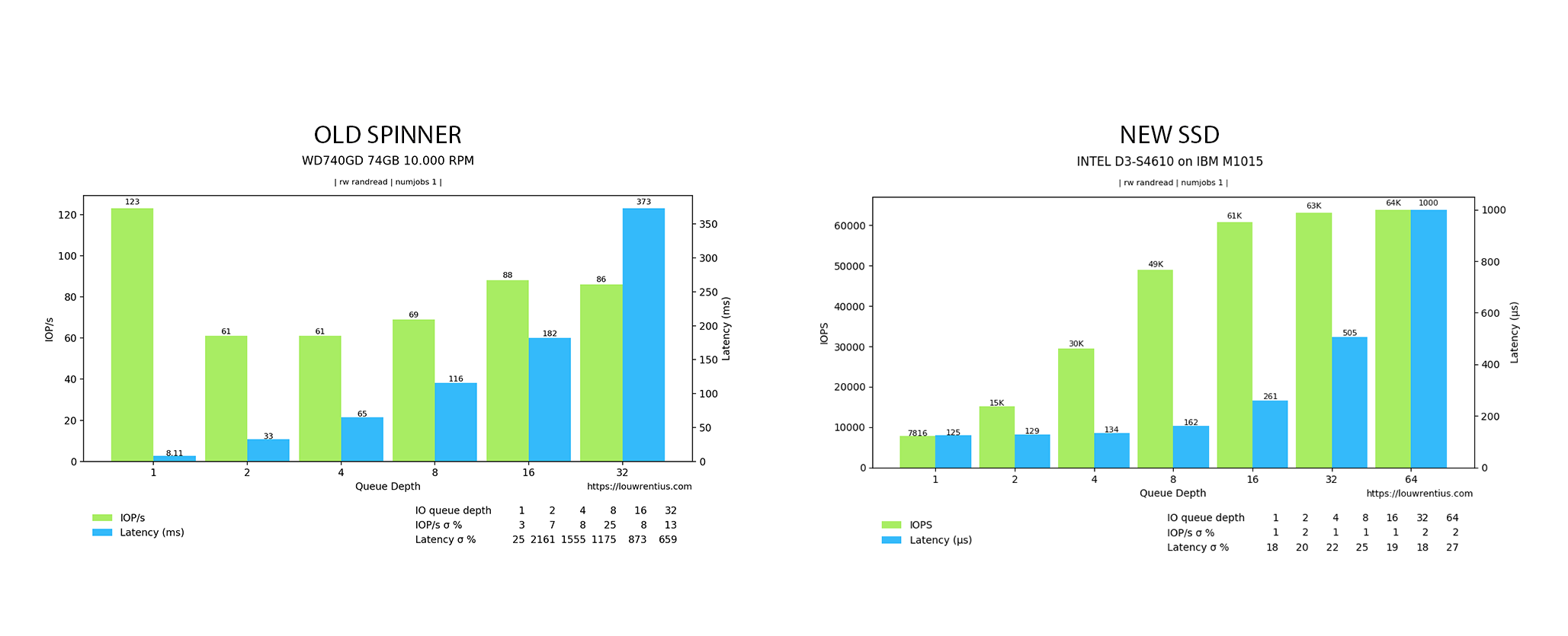
1. Invest in Solid-State Drives (SSDs): Not all hard drives are created equal. Traditional hard disk drives (HDDs) have limited IOPS capabilities compared to SSDs. SSDs use flash memory instead of spinning disks, allowing them to perform much faster. In fact, an average HDD can handle up to 200 IOPS while an average SSD can handle up to 100,000 IOPS.
2. Implement RAID: Redundant Array of Independent Disks (RAID) is a method of combining multiple physical drives into one logical unit for improved performance and redundancy. By distributing workload across multiple drives, RAID can significantly increase the overall IOPS of a system.
3. Utilize Caching Technologies: Caching involves storing frequently accessed data in temporary high-speed memory for quicker retrieval. This reduces reliance on slower primary storage devices and improves overall performance by increasing the number of available IOPS.
4. Optimize Workloads: Certain workloads such as database operations or virtualization require high levels of random-access reads/writes which can put a strain on your storage infrastructure and reduce overall IOPS hard drive capacity. It is important to properly configure these workloads and distribute them evenly across different physical disks or arrays.
5. Fine-Tune Your Storage Architecture: Having a well-designed storage architecture that considers factors such as disk types, array configuration, caching techniques, etc., plays a crucial role in optimizing IOPS performance
6. Monitor Performance Metrics: Keep track of your IOPS metrics regularly to identify any performance bottlenecks and take necessary actions. This will help you pinpoint the areas that need improvement and make informed decisions for optimizing IOPS.
While IOPS is an essential metric for measuring storage performance, it should not be the sole factor when evaluating a system’s capabilities. Real world performance, including application responsiveness, consistency, workload type, and network latency, are all critical aspects to consider to truly understand the effectiveness of a storage solution.
Limitations of IOPS
Solely relying on IOPS can be misleading and limit the comprehensive evaluation of storage systems. In this section, we will discuss the limitations of using IOPS as a sole performance metric and highlight other factors that should also be taken into account.
One of the major limitations of using IOPS as the only performance metric is that it does not take into consideration the size or complexity of each operation. This means that two systems with the same number of IOPS may have vastly different capabilities when it comes to handling larger or more complex operations. For example, an all-flash array may have a higher number of IOPS compared to a traditional hard disk drive (HDD), but it may struggle when dealing with large sequential reads or writes due to its smaller block sizes.
Moreover, IOPS alone cannot provide insight into latency or response time. A system may have high IOPS, but if its response time is slow, it can lead to poor overall performance. This is especially crucial for applications that require consistent and low latency such as databases or virtual desktop infrastructure (VDI). In such cases, focusing solely on IOPS can result in inadequate performance evaluation.
Another factor that needs to be considered is data protection mechanisms such as RAID levels and data replication. These mechanisms can significantly impact storage performance by affecting both read and write operations. While they are essential for ensuring data availability and integrity, they also come at a cost in terms of reduced overall performance.
In addition to technical limitations, there are also practical considerations when it comes to using IOPS as a primary metric for storage performance. The workload type plays a crucial role in determining how many IOPS are required for optimal system functioning. For instance, random workloads tend to generate more small-sized operations which require higher numbers of IOPS compared to sequential workloads that involve larger operations.